
Standard software leaves important process steps uncovered.
Solutions / 04 / Custom Software Development
Software that fits your business.
Turn an operational bottleneck into an application with clear workflows, suitable interfaces and verifiable quality.
Standard software cannot cover every business workflow. NALVRA designs and develops custom applications, specialist solutions and integrations with security, usability and future development in mind.

Who we work for
For department heads, IT managers and business leaders whose processes cannot be adequately covered by standard software alone.
Custom business applications
Defined first use case with user roles
Your starting point
When standard software does not reflect your process.
We clarify requirements and interfaces, create a testable first result and develop it incrementally. AI-assisted tools can support development; quality assurance and acceptance remain essential.
- Standard software leaves important process steps uncovered.
- Spreadsheets and manual handovers connect multiple systems.
- A specialist application needs a clear, maintainable technical foundation.
A connected workflow
User roles, data and processing steps are considered together. This creates a shared working context rather than another isolated application.
Something testable early
A prototype makes interaction and workflow tangible. You can make business decisions before the full feature set is developed.
A sustainable handover
Documented interfaces, business tests and a clear operating model provide a foundation for maintenance and targeted development.
What we contribute
From business requirement to usable application.
We tailor these building blocks to your project.
Custom business applications
We implement your business logic in a custom application: data model, roles, statuses and exceptions. Scope follows the workflows your staff actually need.
Customer portals & workflows
Portals connect internal and external participants through clearly limited access. Requests, documents, approvals and statuses receive a traceable place in the process.
APIs & system integration
We assess existing APIs and define data mapping, responsibilities and error handling. Retries and interrupted transfers are considered when designing an interface.
Modernize individual modules
One module can be a sensible start: scheduling, quote preparation or approvals, for example. Existing systems remain connected through agreed interfaces.
UX & process design
With future users, we translate the process into understandable interfaces. Prototypes expose unnecessary input, unclear handovers and missing feedback early.
Testing, documentation & operational preparation
Business acceptance scenarios, access tests and documentation accompany development. Deployment, backup, recovery and responsibilities are clarified within the agreed scope before handover.
Concrete use casesWhat this could look like
What this could look like
in practice.
Illustrative project scenarios show possible approaches. They are not documented customer references.
From field report to a verifiable case.
The starting point
A service business records visits in spreadsheets, stores photos separately and later manually transfers billable work to administration.
A possible approach
A business application could connect the order, checklist, materials and equipment photos. After expert review, approved items would be passed through a suitable interface.
Possible outcome
The aim is a connected case with processing status, linked evidence and a traceable handover to billing.
Handle requests without email ping-pong.
The starting point
A service provider receives project inquiries and documents through multiple inboxes. Customers repeatedly ask about progress.
A possible approach
A portal could accept structured requests, assign documents to a case and show approved status information. Internal notes would remain with the responsible team.
Possible outcome
The aim is a shared, current reference point for the inquiry, with a clear separation between internal processing and the customer's view.
Reconcile master data between CRM and ERP.
The starting point
Customer data is maintained in two applications. Changes diverge and staff must resolve conflicts manually.
A possible approach
An integration could define the leading system for each field and transfer approved changes. Conflicts and incomplete records would enter a review queue.
Possible outcome
The aim is traceable synchronization with visible exceptions, rather than silent overwrites or unnoticed duplicates.
From business process to application
Four components that must work together.
A good interface alone is not enough. The application must meet business needs, work with existing systems and remain supportable in daily use.
01Business process
Who performs which step, with what data and whose approval?
02Application
Interfaces, roles and business rules make the workflow understandable.
03Interfaces
Defined handovers connect the application to ERP, CRM or specialist systems.
04Operations
Access, updates, monitoring and recovery have clear owners.
Schematic illustration. Technology, hosting and interfaces are selected according to your requirements.
A transparent approachFrom the first conversation
From the first conversation
to a controlled outcome.
Each phase informs the next decision. Scope, responsibilities and acceptance are agreed before implementation.
- 01
Clarify requirements
We examine users, triggers, data and exceptions. Together, we distinguish the essential initial scope from later additions.
Possible deliverableProcess map, prioritized requirements and business acceptance criteria. - 02
Test a prototype
A testable design shows the main paths through the application. Department feedback informs delivery before wider implementation.
Possible deliverableAgreed prototype with decisions on interaction and workflow. - 03
Develop incrementally
We deliver in transparent stages, connect interfaces and test relevant business and technical boundaries.
Possible deliverableTestable development versions and documented results. - 04
Accept & hand over
Responsible specialists check the agreed scenarios. Deployment, training and ongoing support are explicitly agreed.
Possible deliverableAcceptance record, documentation and agreed operating concept.

Your starting point
Requirements and process workshop
Bring a specific workflow: how work is done today, the systems involved and the problem to solve. This helps define a sensible initial development scope.
- Defined first use case with user roles
- Overview of data, interfaces and open questions
- Proposal for prototype, implementation and business acceptance
Software when it fits the need
Tools for your workflows.
Our own applications can complement delivery. Your requirements and actual interfaces are decisive; other suitable technologies are also considered.
 On request
Business & OperationsMCP-enabled
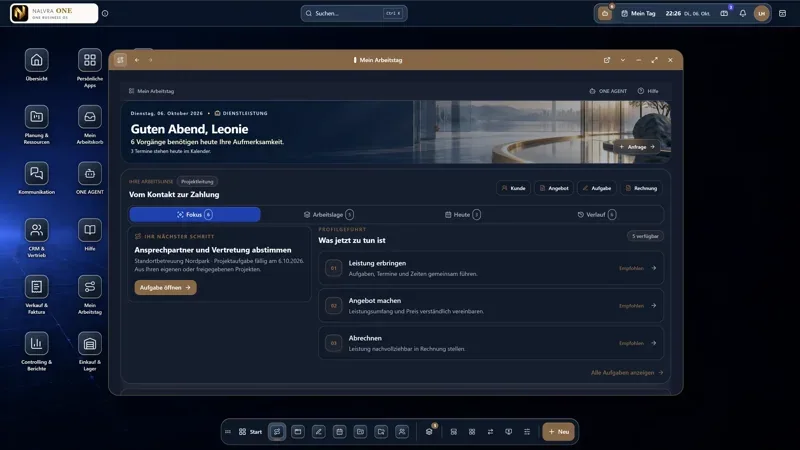
NALVRA ONE
The Business Operating System for small and midsize businesses.
View product External website · new tab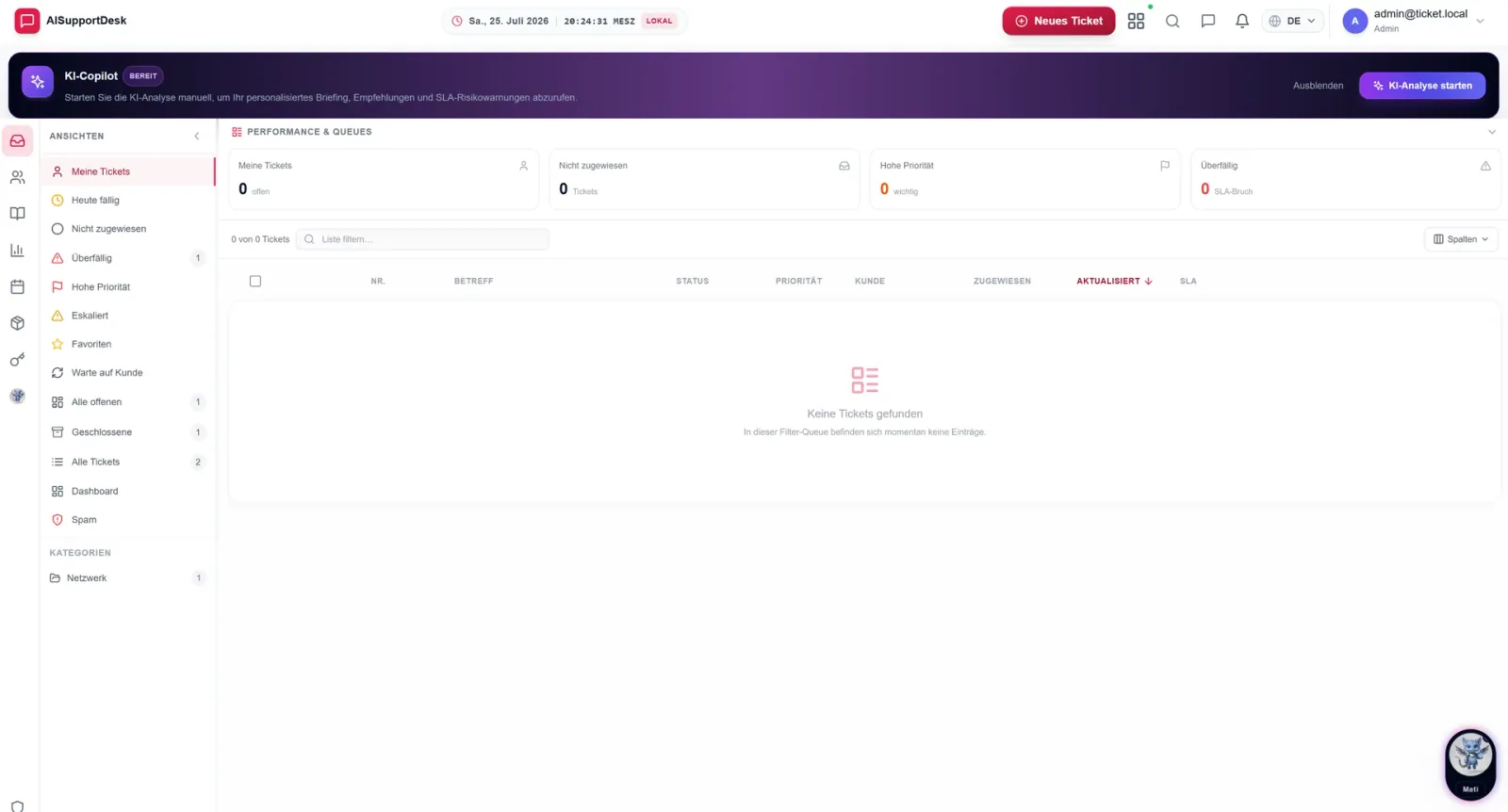 On request
Business & OperationsMCP-enabled
NALVRA SERVICE
Service and support platform for tickets, knowledge and technical resources.
View product External website · new tabSee the connectionsAnother perspective
Another perspective
can be worthwhile.
Questions before the first step
Useful questions. Clear answers.
How is scope defined?
Together, we define users, workflows, interfaces and acceptance criteria. This provides a transparent plan.
How does the application remain maintainable?
Through documented interfaces, suitable technologies, tests and an agreed handover and operations strategy.
Must the new application replace an existing solution?
Not necessarily. An addition can often cover a missing process step. We assess which functions should remain and where a custom application adds practical value.
How do you use AI in software development?
AI tools can support designs, code and documentation. People remain responsible for architecture, review and approval. Confidential data is processed only in approved environments.
Your project. Our next conversation.
A good next step starts with clarity.
Describe your situation. We will discuss goals, technical prerequisites and a suitable starting point.